
Artemis
Product Design
Overview
Artemis is a web application concept designed to support individuals experiencing digital harassment by providing personalized guidance, educational resources, and actionable next steps. Developed as a collaborative product design project, Artemis combines user research, information architecture, and interface design to create a safe, approachable platform that empowers users to better understand and respond to their situations. Throughout this project, I contributed to the user research, design strategy, and interface design while leading the visual design of several key pages.
The Problem
Digital harassment affects individuals of all ages, yet many are unsure how to safely respond, document evidence, or determine what actions to take. Our goal was to design a digital platform that provides trustworthy guidance and personalized support while empowering users to navigate these situations with confidence.
-
Designed the homepage experience
Designed the Discovery page
Designed the Case Breakdown pages
Established typography and color system
Collaborated on research, user flows, personas, and information architecture
-
California Polytechnic State University (Cal Poly)
-
3-5 Weeks / Winter Quarter 2026
-
Figma
-
Product Design / User Research / Information Architecture / UI Design / Visual Design / Design Systems / Prototyping / Figma
Goals
Our research revealed that many individuals experiencing digital harassment felt uncertain about what steps to take and lacked access to centralized, trustworthy resources. Artemis was designed to bridge that gap by educating users, providing personalized guidance, and empowering them to respond with confidence.
Research
Survey Responses
Sample Size / 50
66% Experienced harassment on social media
94% Never used an online support platform
46% Experienced harassment before the age of 18
Key Insight
Users wanted clear, trustworthy guidance more than another discussion forum.
Competitor Analysis
Tea App
Community
Limited guidance
My Plan
Research backed
Focused only on partner violence
Artemis
AI Guidance
Evidence Archive
Educational Resources
User Persona
Demographic
Age / 20
Occupation / Undergrad Student
Location / College Town
Gender / Female
Psychographic
Feelings / Frequently feels angry and frustrated that her digital space is being invaded. She also feels a deep sense of embarrassment and occasionally weak or fearful, which makes her hesitant to share her experience with family or authority figures.
Response / She usually doesn't take formal action until the harassment starts affecting her mood and mental well-being or until she realizes the behavior has become a pattern she can no longer ignore.
Behavior
Experience / Receives unsolicited messages and receiving explicit content (unwanted photos/videos)
Platforms / She faces the most hostility on Social Media (Instagram/ Snapchat) followed by Messaging apps.
Ways of Coping / Her first instinct is to block the harasser on all platforms and simply wait for it to end. She occasionally searched for steps online but rarely uses dedicated forums or online support groups.
Goals and Needs
Main Goal / She wants the harassment to “Just go away” without a long, public, or legally taxing process.
Desired Outcomes / She needs retrieval (ensuring any photos or posts are taken down) and confirmation (objective clarity on whether the situation is a crime or a violation of terms)
Information Needed / She is highly likely to report a case if she is given a clear, step-by-step roadmap on exactly how to do it.
Frustrations
Persistence / Frustrated by harassers who create new accounts after being blocked, making her “block and delete” strategy feel like a temporary fix.
Lack of Clarity / Unsure if her case is “serious enough” to bring to the police of her university.
Social Stigma / Hates the feeling of embarrassment that comes with “explaining” a digital threat to older adults who might not understand the nuance of online culture.
Information Architecture
Site Map
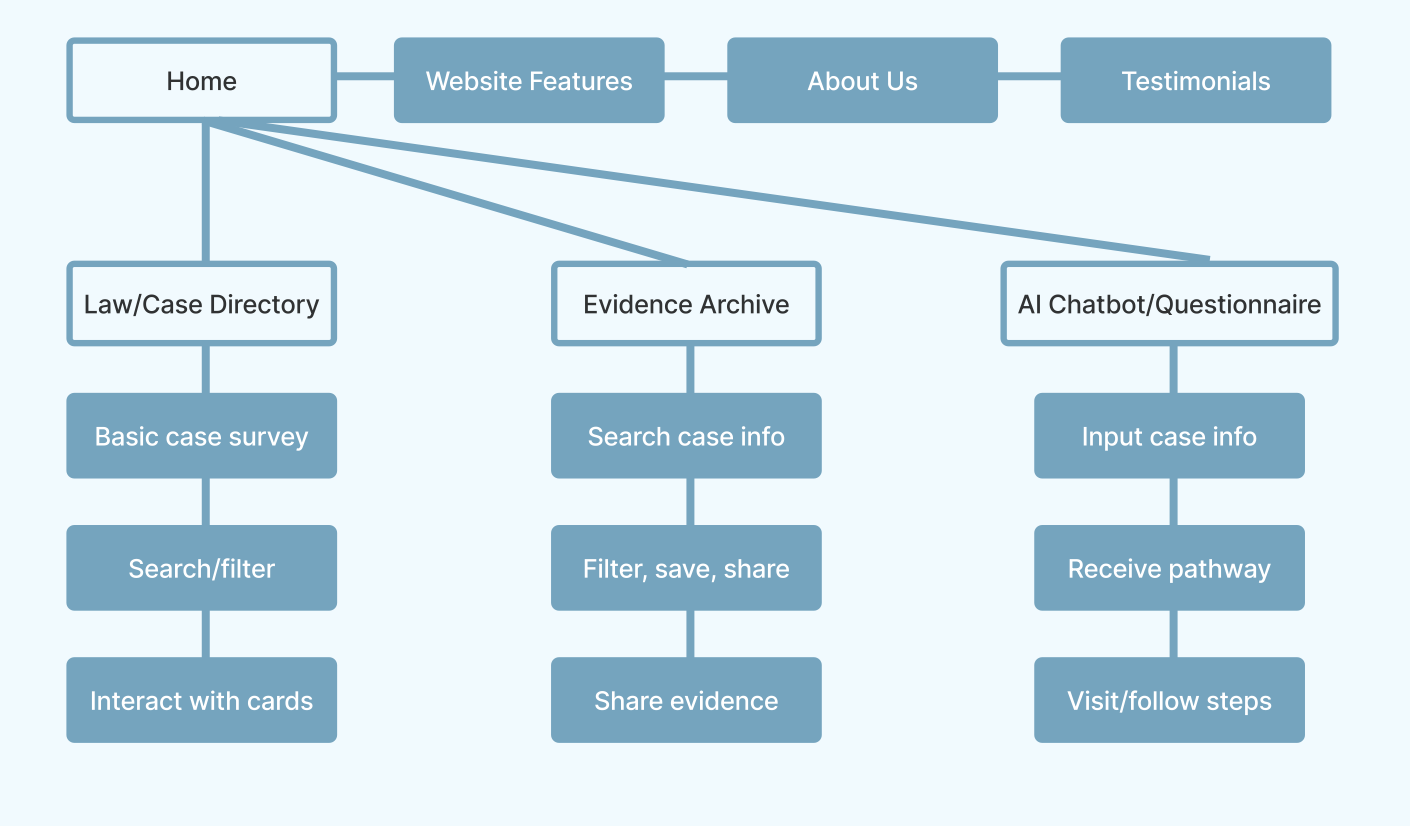

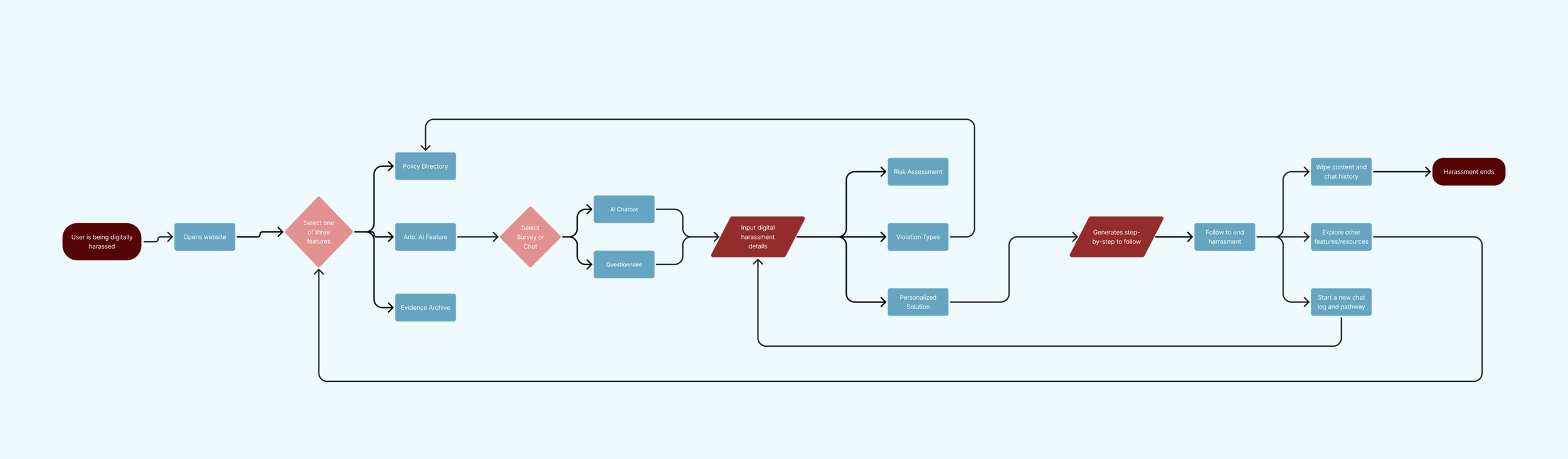
Task Flow
User Flow
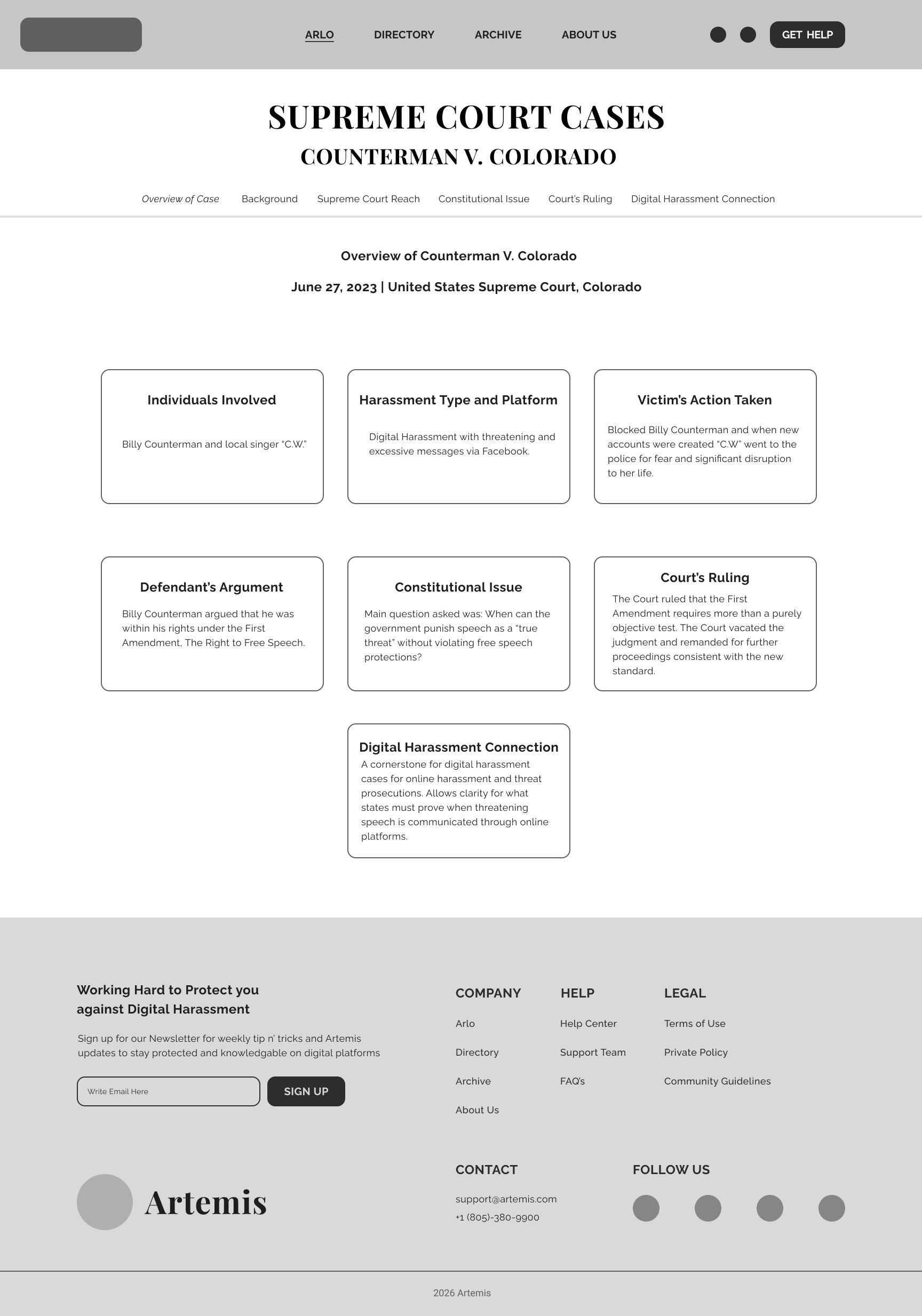
Wireframes
Wireframes
Colored Wireframes
Design System
Logo

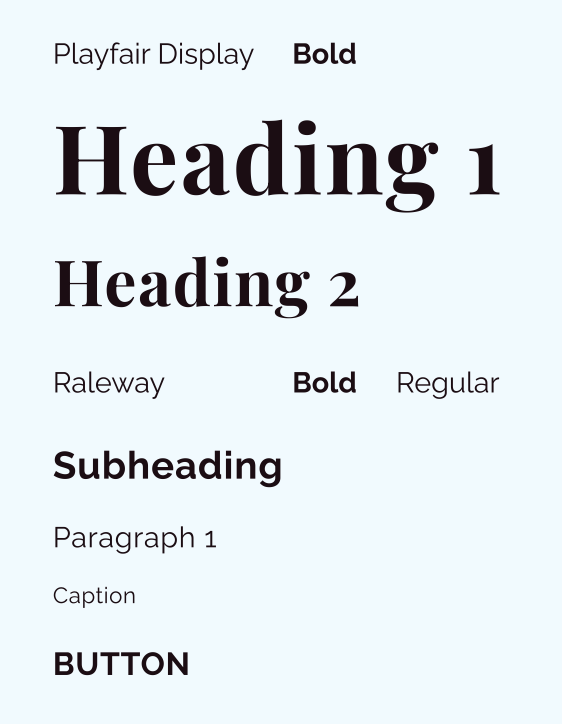
Typography
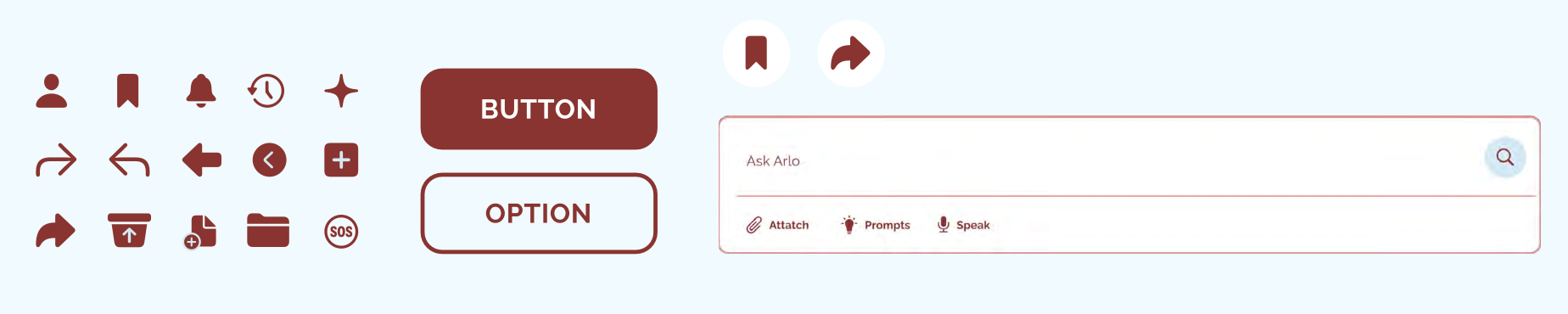
Iconography and Components
Primary Color
Secondary Color
Final Design
Guided by user research and iterative design, the final product was designed to help users navigate digital harassment with confidence through personalized guidance, accessible legal resources, and organized evidence management.
Homepage
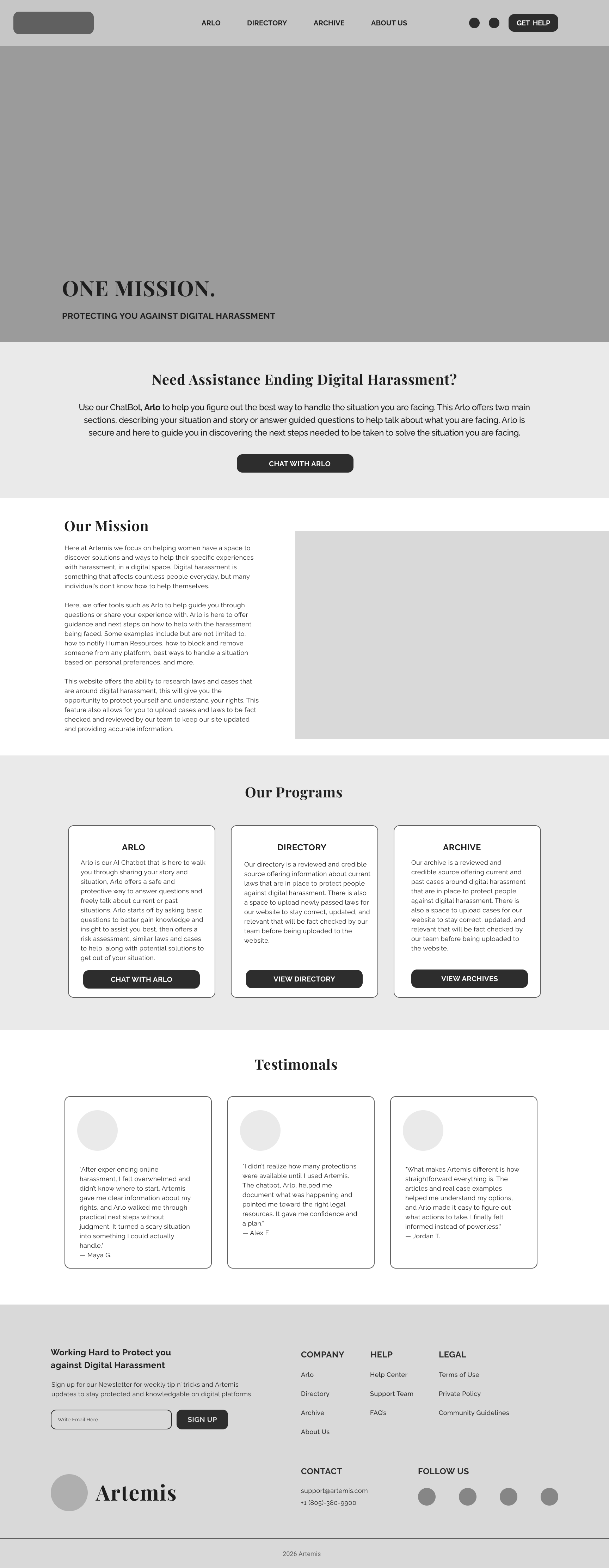
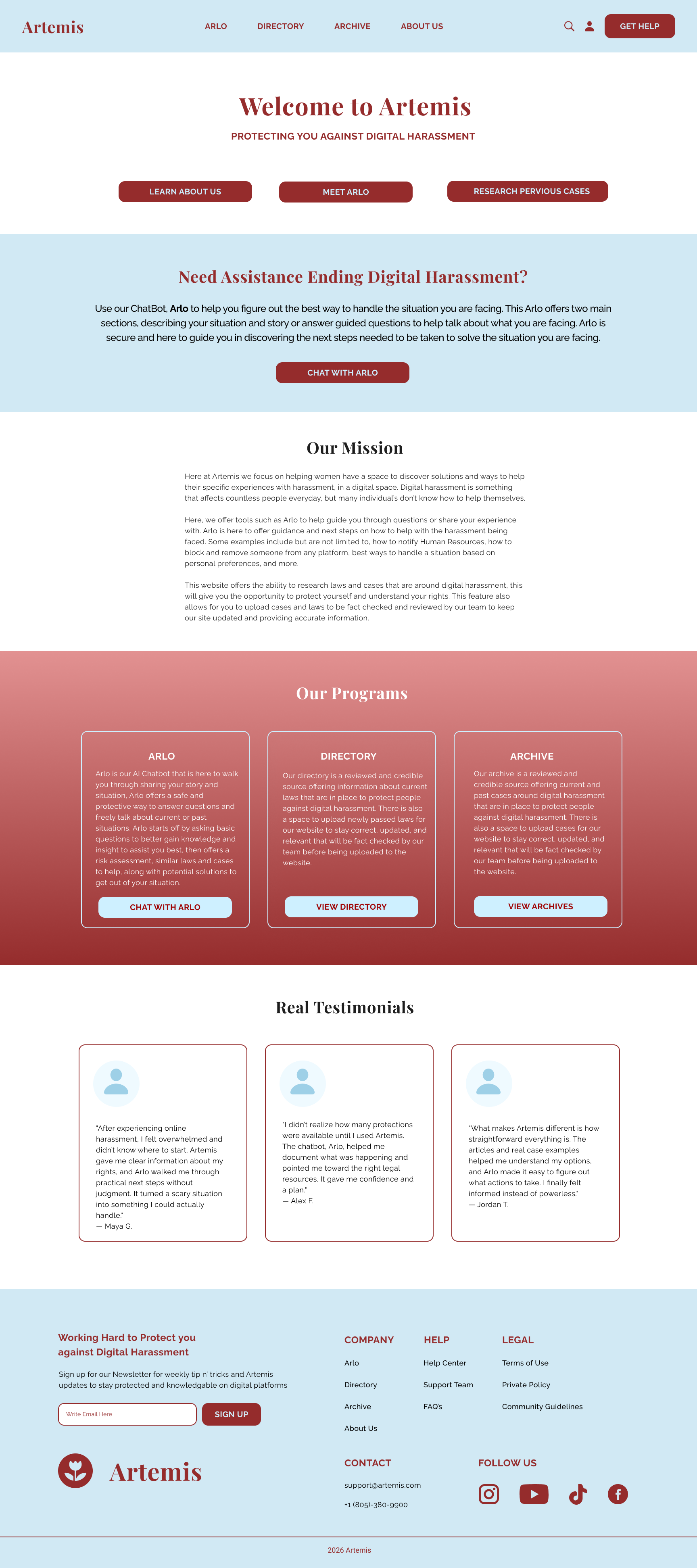
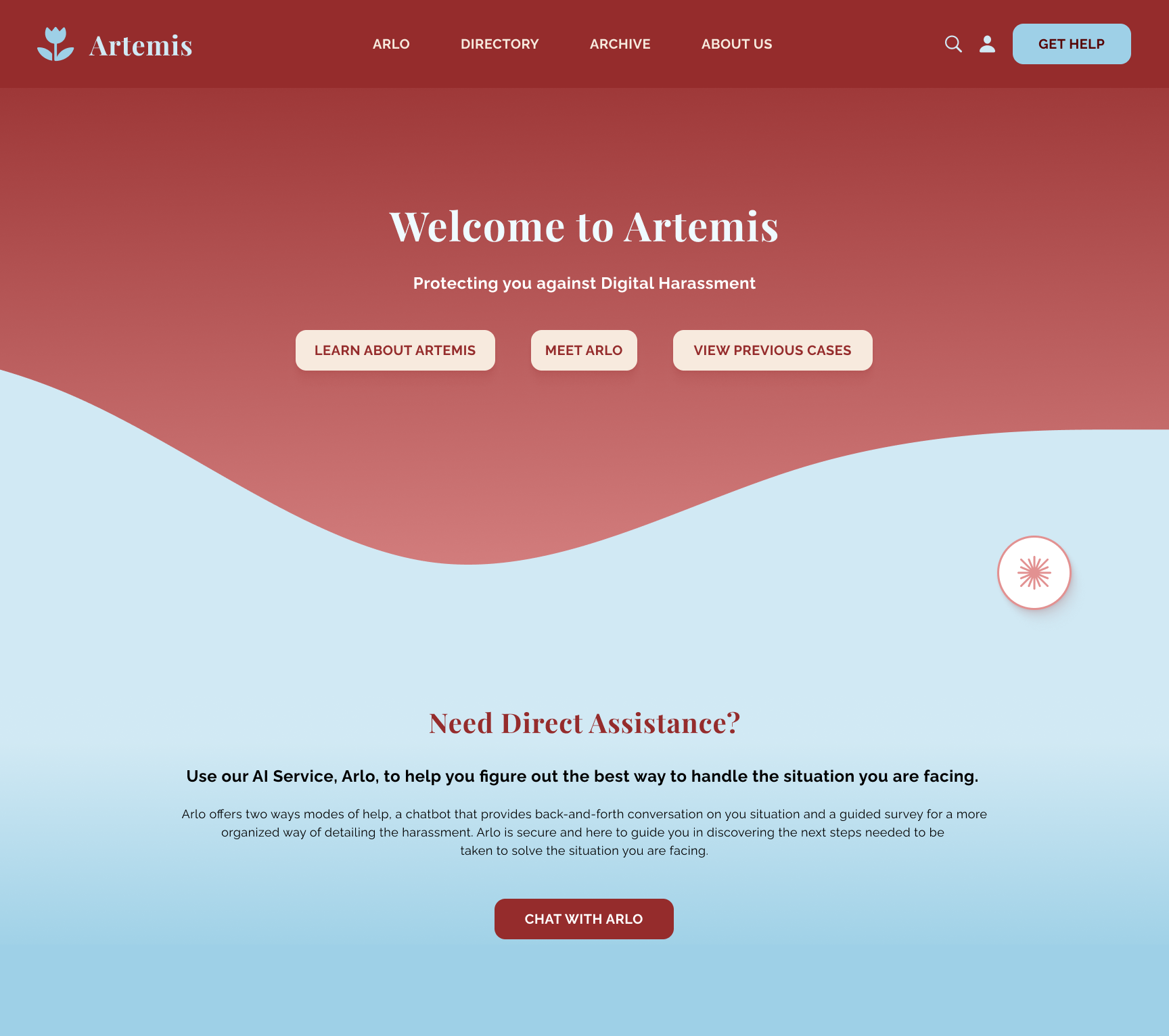
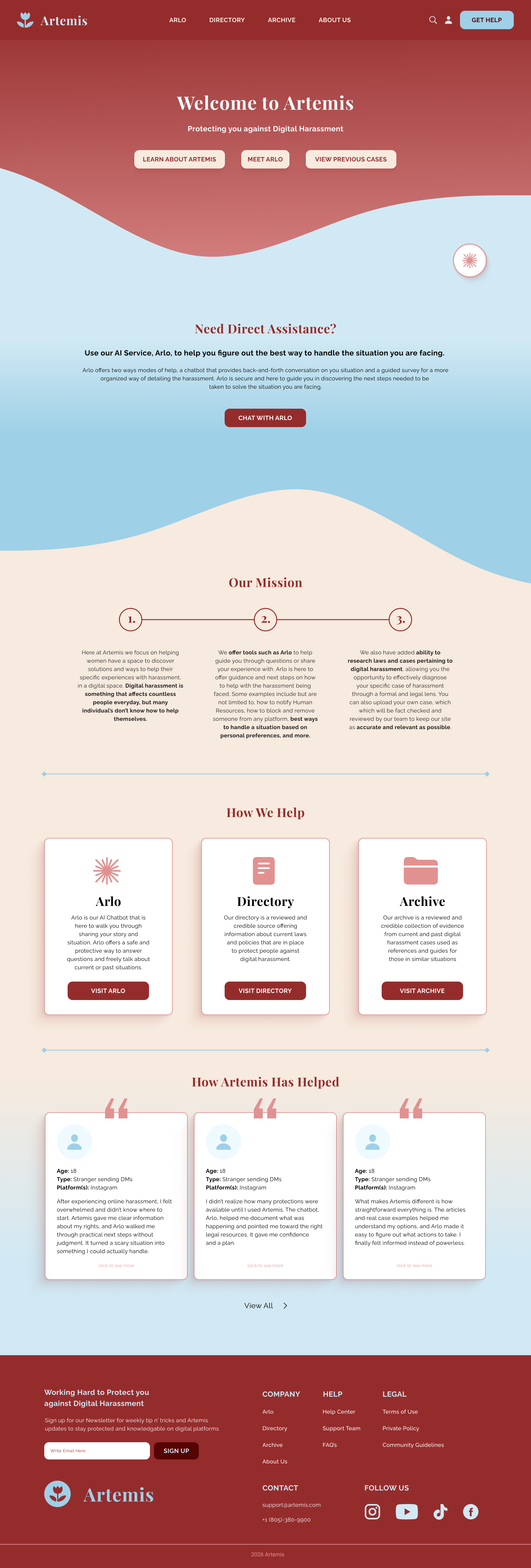
The homepage was designed to establish trust while helping users quickly understand Artemis's purpose. Through a clear visual hierarchy, welcoming language, and prominent calls to action, users can immediately choose the type of support they need, whether learning about digital harassment, exploring previous cases, or receiving personalized guidance through Arlo, the AI assistant.
Homepage Goals
Establish Trust
Introduce available resources
Reduce user uncertainty
Guide users toward appropriate support
Navigation
Simple navigation allows users to immediately access educational resources, evidence archives, and AI guidance.
Hero Call To Action
The homepage presents three clear entry points based on user intent, reducing uncertainty and decision fatigue.
Color Palette
Soft neutrals and muted reds were chosen to create a calm, supportive experience rather than one that feels clinical or alarming.
Section Flow
The homepage introduces the problem, explains the mission, presents available resources, and builds credibility through user testimonials.
Directory
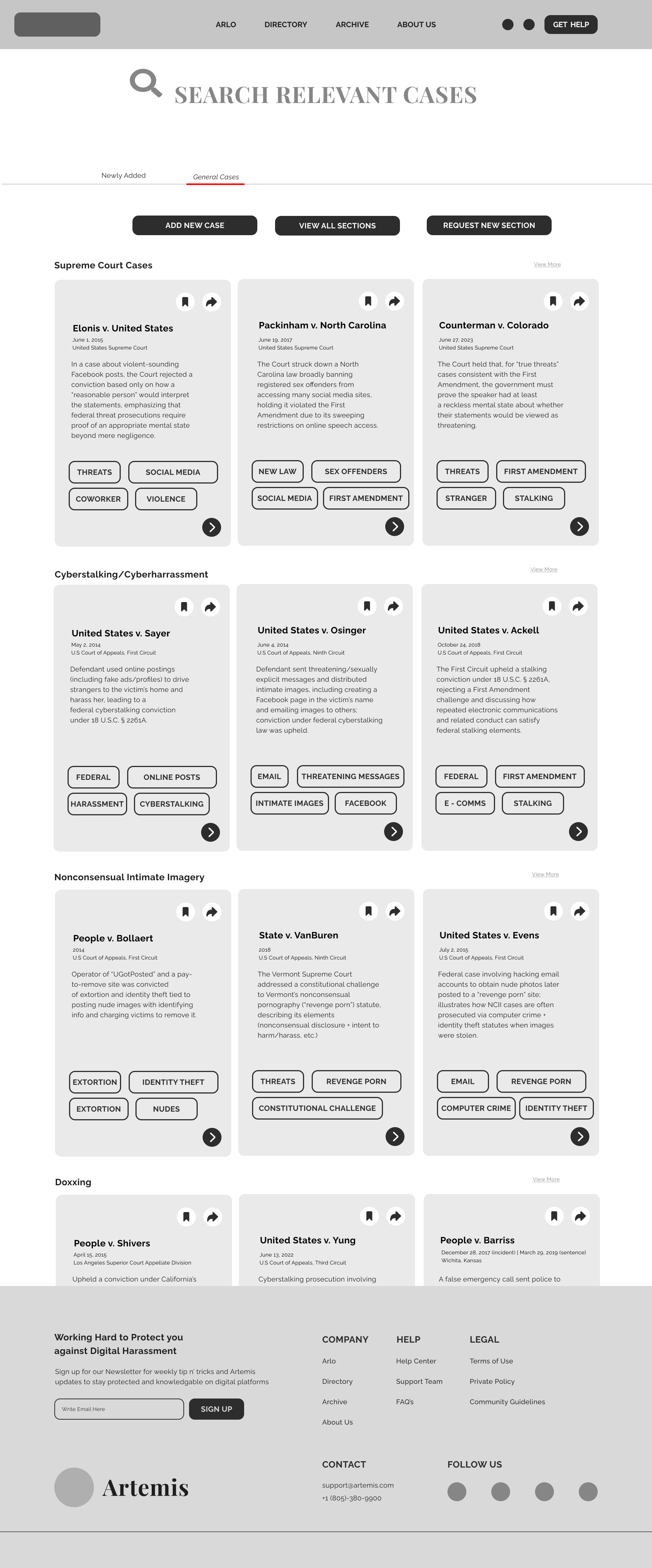
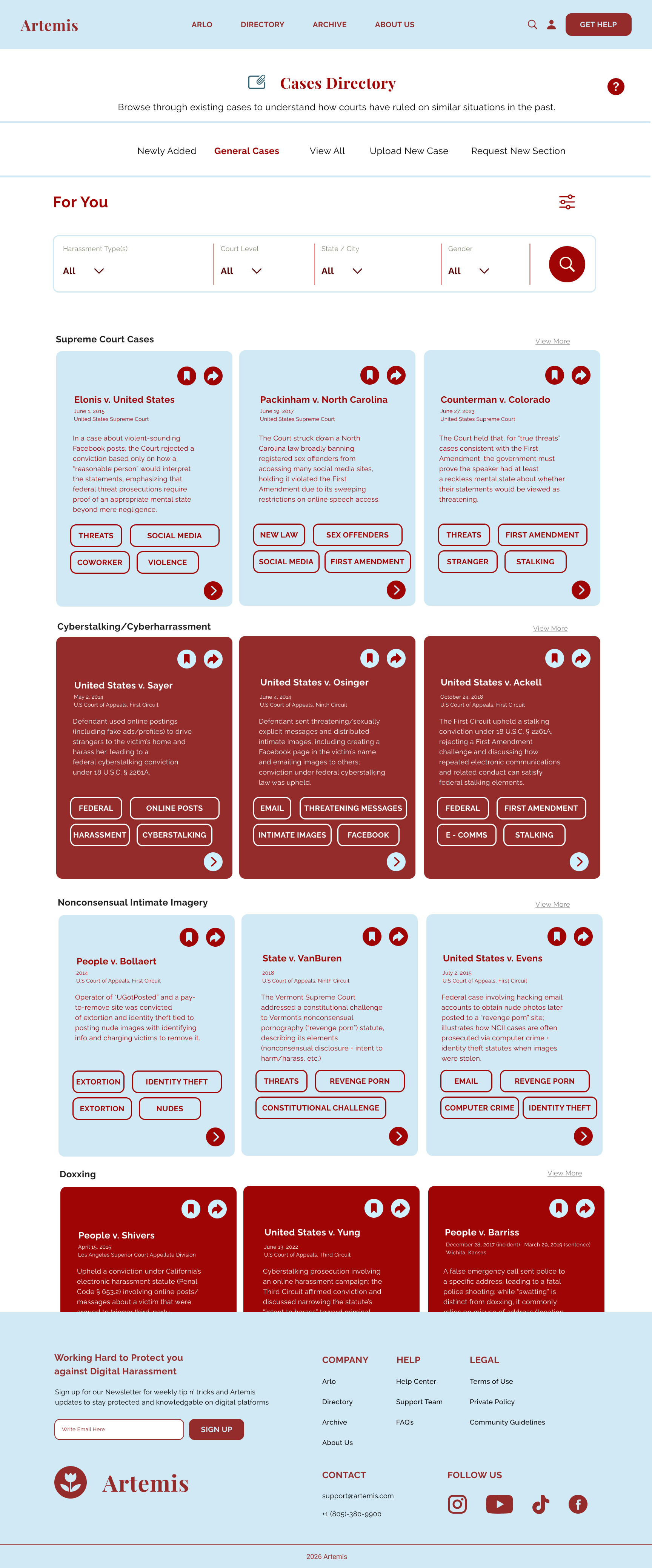
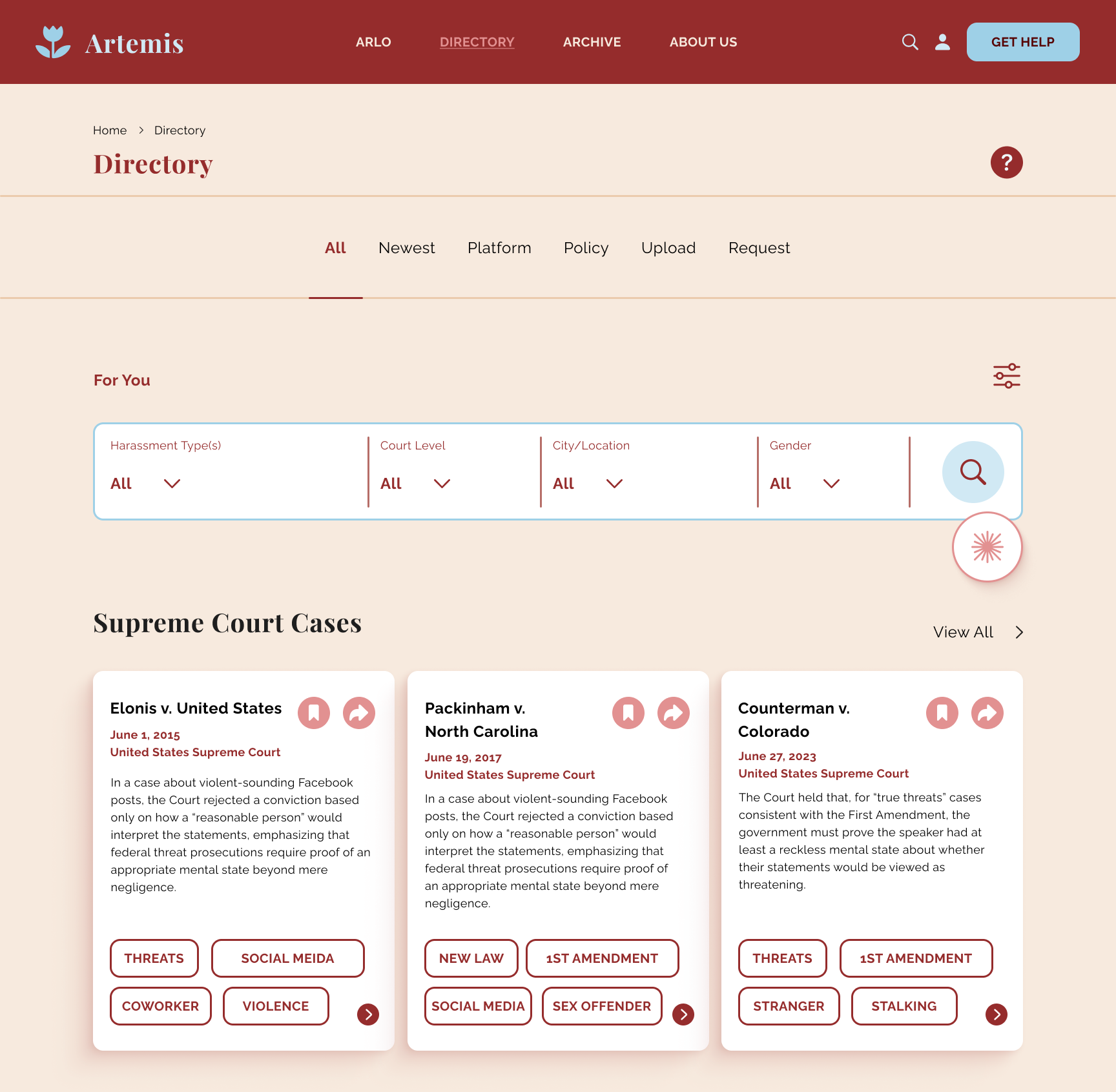
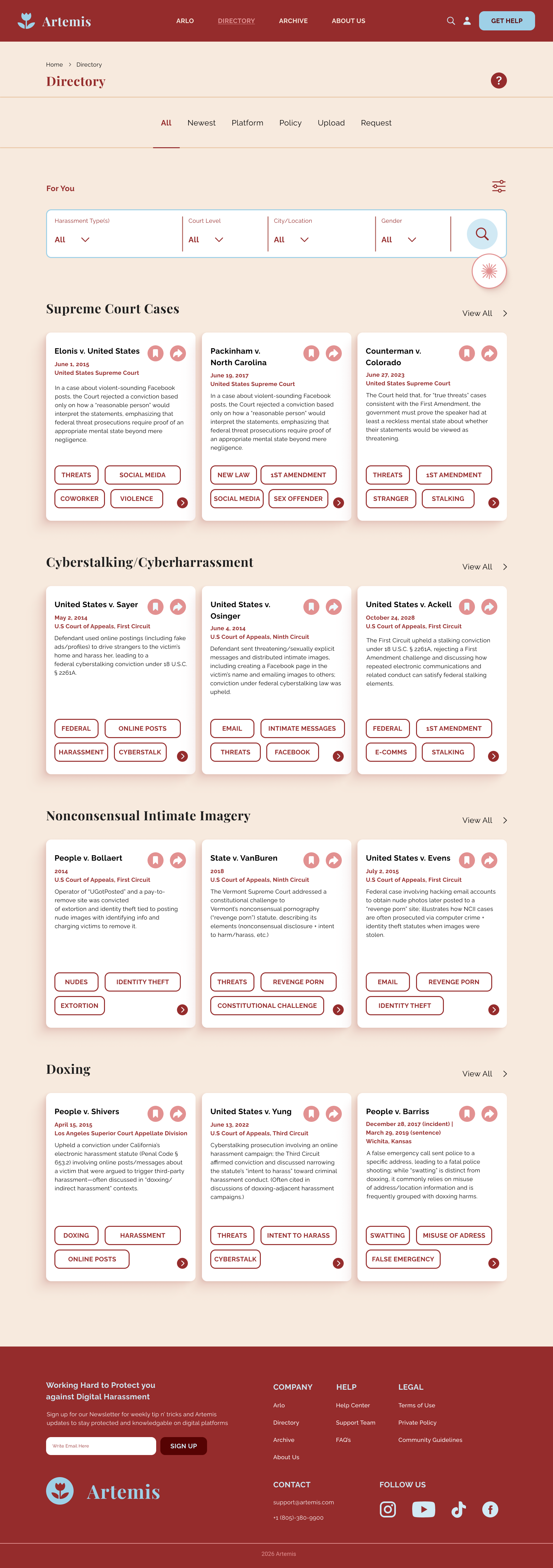
The Directory was designed to transform complex legal cases into a searchable, user-friendly database. Instead of overwhelming users with lengthy legal documents, the interface organizes previous cases into categorized cards, allowing users to quickly browse, compare, and discover information relevant to their specific situation.
Directory Goals
Make legal information easy to browse
Reduce information overload
Help users find cases similar to their own experiences
Encourage exploration through filtering and categorization
Advanced Filtering
Multiple filtering options allow users to narrow results by harassment type, court level, platform, location, and demographic information, helping users quickly find the most relevant legal cases.
Categorized Case Cards
Each case card presents essential legal information in a scannable format, allowing users to compare multiple cases without reading lengthy court documents.
Topic Organization
Cases are grouped into categories such as cyberstalking, nonconsensual intimate imagery, and doxing, making it easier for users to explore topics related to their own experiences.
Visual Hierarchy
Typography, spacing, and color create a clear reading order, allowing users to quickly distinguish case titles, summaries, legal tags, and actions without feeling overwhelmed.
Case Details
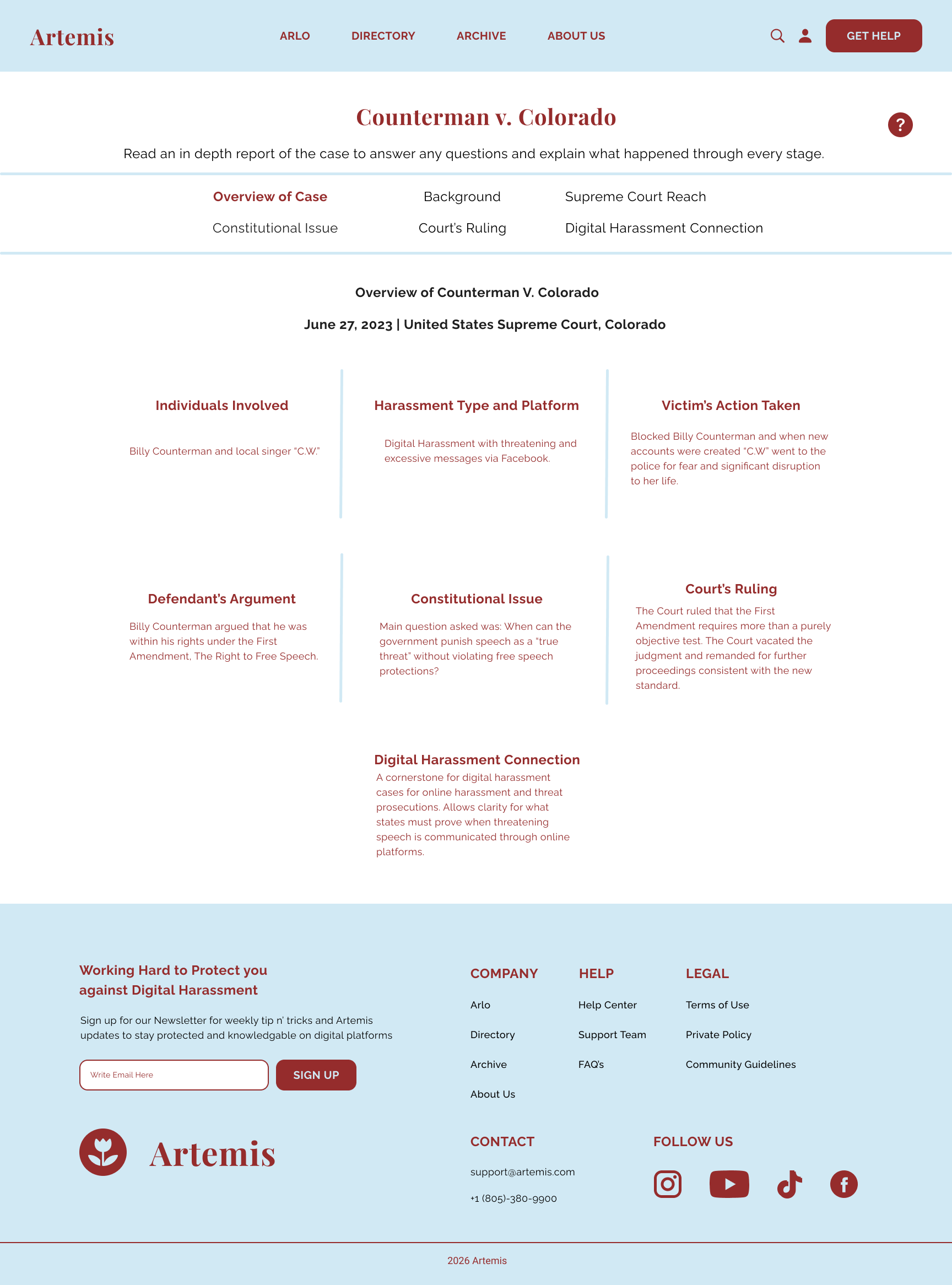
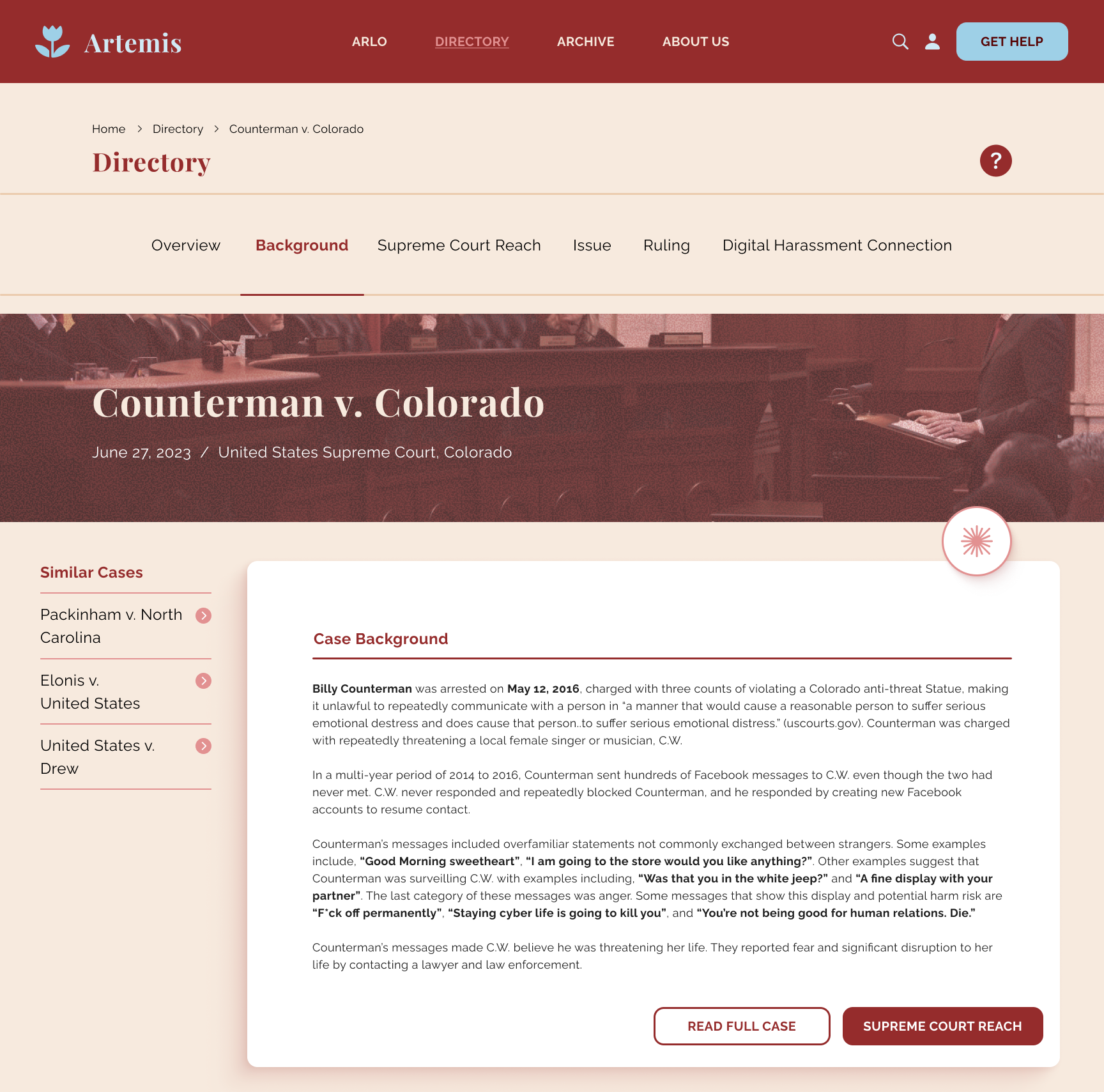
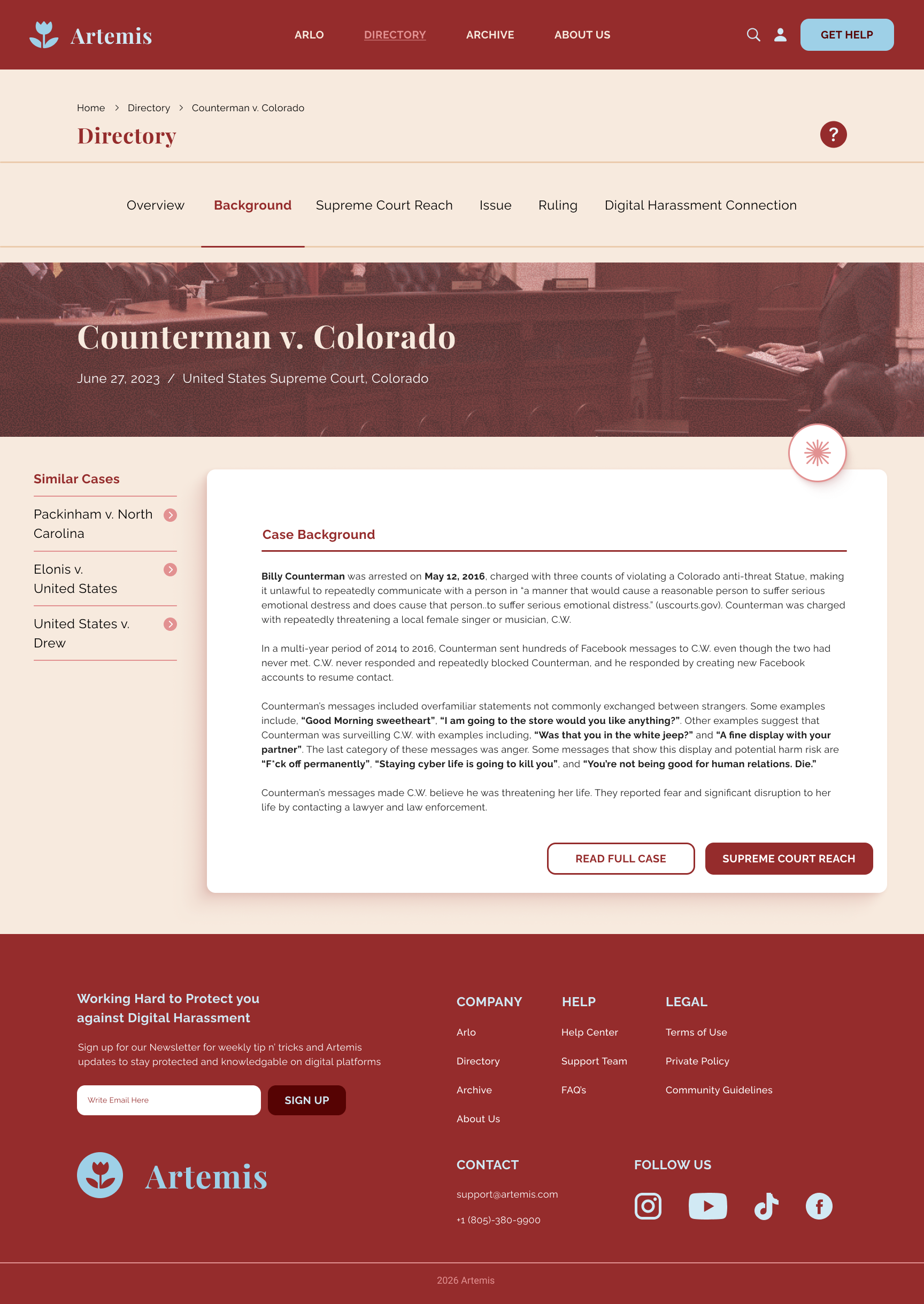
Once a user selects a case, the detailed view presents legal information in a structured, approachable format. Rather than expecting users to interpret dense legal documents, the interface breaks each case into digestible sections that explain the background, constitutional issues, court rulings, and connections to digital harassment.
Case Details Goals
Simplify complex legal language
Improve comprehension
Provide context before linking to official court documents
Help users understand how cases relate to their own situation
Section Navigation
Breaking the case into individual sections allows users to explore information at their own pace without becoming overwhelmed by lengthy legal text.
Similar Cases
Related cases encourage continued exploration while helping users compare legal outcomes across similar situations.
Structured Information
Content is divided into clearly defined categories, including case background, constitutional issues, court rulings, and digital harassment connections, to improve readability and comprehension.
Supporting Resources
Primary calls to action allow users to continue learning by viewing the complete court case or exploring additional legal context when desired.
Evidence Archive
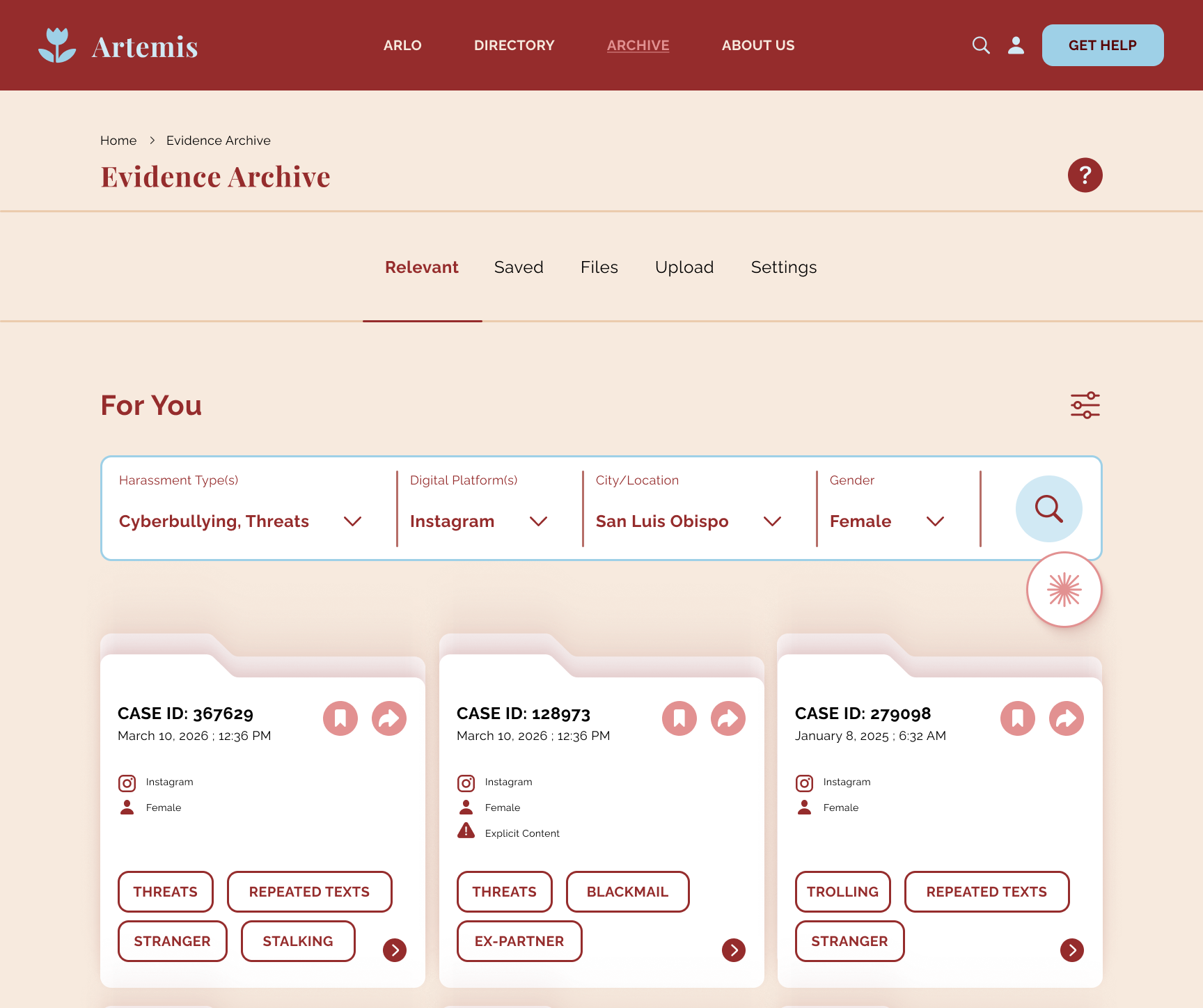
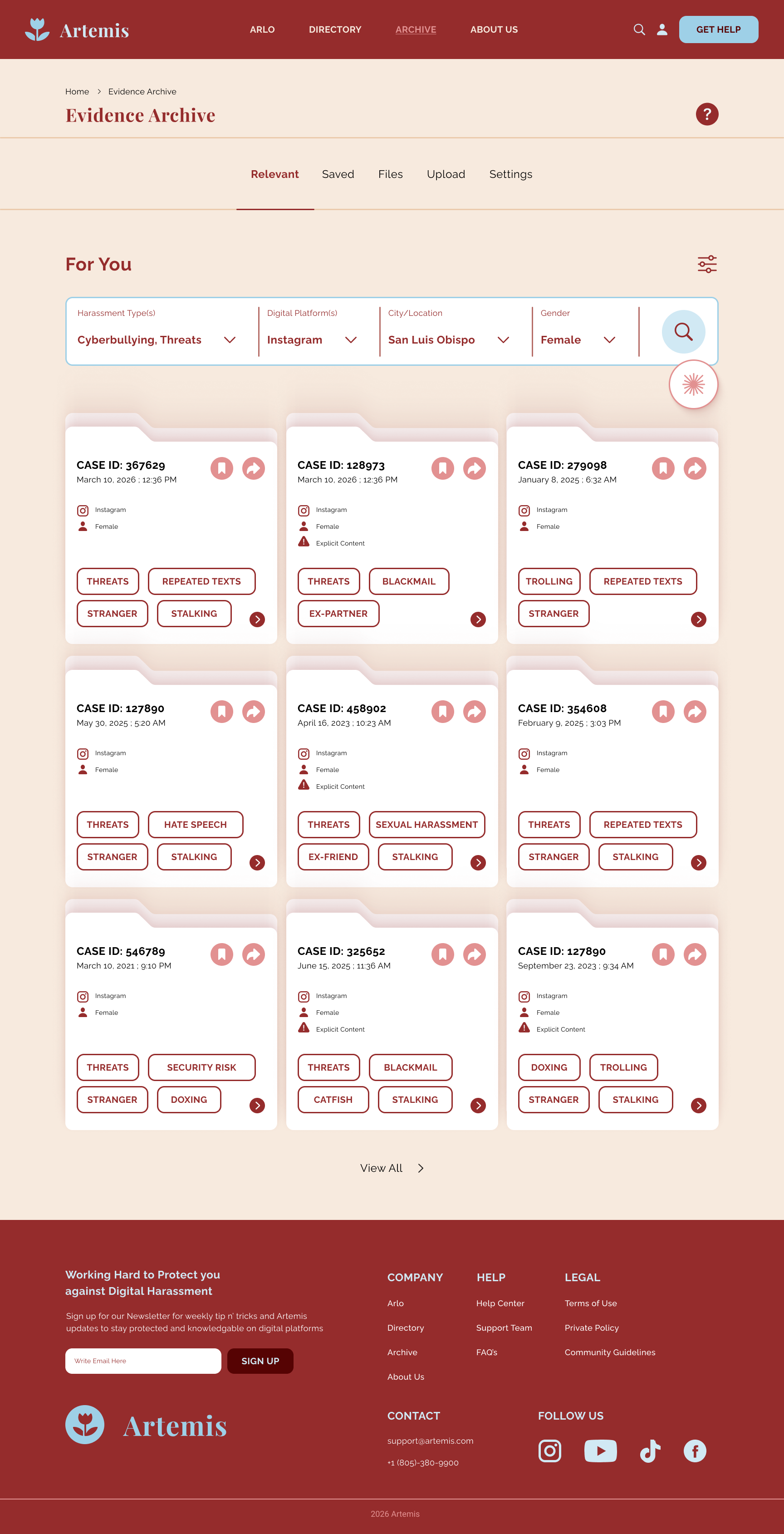
The Evidence Archive provides users with a private, centralized space to organize incidents, supporting documentation, and relevant case information. By combining filtering, categorization, and searchable records, the archive helps users maintain a clear timeline while preparing evidence for future reporting or legal action. Many individuals experiencing digital harassment struggle to keep screenshots, messages, and supporting documentation organized across multiple platforms. The Evidence Archive was designed to provide a single, secure location where users can collect, categorize, and revisit important information whenever they need it.
Evidence Archive Goals
Organize evidence in one secure location
Make records easy to search and retrieve
Help users build clear documentation over time
Simplify evidence management during stressful situations
Smart Filtering
Filtering by harassment type, platform, location, and demographic information allows users to quickly locate relevant evidence and revisit specific incidents without searching through every record.
Evidence Cards
Each evidence card summarizes essential details, including timestamps, platform, harassment type, and descriptive tags, creating a consistent format that is easy to scan and organize.
Tag-Based Organized
Descriptive tags help categorize incidents by behavior and context, making it easier to identify patterns, retrieve documentation, and prepare organized evidence when needed.
Flexible Tagging
Behavioral tags such as "Threats," "Blackmail," and "Stalking" allow users to quickly categorize incidents while making related evidence easier to search and compare.
Personalized Workspace
The archive presents users with a customized view of their saved evidence, encouraging ongoing documentation while reducing the stress of managing information across multiple platforms.
Arlo AI
Arlo was designed to provide users with personalized guidance through difficult and often overwhelming situations. Rather than presenting large amounts of legal information upfront, the chatbot asks targeted questions, gathers context, and delivers tailored recommendations that help users understand their situation and identify appropriate next steps. Questions and recommendations are presented progressively throughout the conversation, helping users focus on one decision at a time while reducing cognitive load during emotionally stressful situations.
Arlo Goals
Provide personalized support through guided conversations
Reduce uncertainty with step-by-step recommendations
Connect users with relevant legal and educational resourees
Crate an approachable experience for discussing sensitive situations
Guided Conversation
Rather than overwhelming users with complex legal information, Arlo uses a conversational interface to collect context gradually, making difficult situations feel more approachable and manageable.
Structured Responses
Predefined response options simplify decision-making while allowing users to quickly communicate their situation without needing to know legal terminology.
Personalized Recommendations
As users answer questions, Arlo generates tailored next steps, educational resources, and reporting guidance based on the specific circumstances they describe.
Connected Resources
Rather than functioning as an isolated chatbot, Arlo integrates with the Directory and Evidence Archive, encouraging users to continue learning while organizing documentation relevant to their case.
Reflection
Artemis challenged me to think beyond visual design and focus on creating a product that could genuinely support users during sensitive situations. Collaborating with a teammate throughout the research, ideation, and design process strengthened my ability to communicate design decisions, incorporate feedback, and build upon one another's ideas. Through user research and iterative design, I learned how thoughtful information architecture, clear user flows, and intentional interface decisions can transform complex topics into approachable experiences. Most importantly, this project reinforced that thoughtful design isn't just about creating intuitive interfaces; it's about creating experiences that help people feel informed, supported, and confident enough to take the next step.